| md5: | b697b84ad3d93f58347657154a6f4482 | kernel-4.19.116-x86_64-dm.txz |
| sha1sum: | 61b4e263421b3420284743f8af7ea0271ebb7144 | kernel-4.19.116-x86_64-dm.txz |
| binaries: | kernel-4.19.116-x86_64-dm.txz | packaged for slackware64-current, post version 14.2 |
| official source: | linux-4.19.116.tar.xz |
Sunday, April 19, 2020
Slackware64-current (post 14.2): my compile for kernel 4.19.116
Here is a fairly generic modular kernel compiled under Slackware -current (64-bit), gcc 9.3.0. The usual caveats for GPL software apply. Use at your own risk. Note: the latest official kernel in the Slackware64-current changelog is 5.4.33. I've been sticking with 4.19.x because of issues with the i915 module that cropped up on my specific hardware.

Friday, March 20, 2020
Slackware64-current (post 14.2): my compile for kernel 4.19.111
Here is a fairly generic modular kernel compiled under Slackware -current (64-bit), gcc 9.3.0. The usual caveats for GPL software apply. Use at your own risk. Note: the latest official kernel in the Slackware64-current changelog is 5.4.25. I've been sticking with 4.19.x because of issues with the i915 module that cropped up on my specific hardware.
| md5: | c80d908077ec535355d4f00cc2c95c10 | kernel-4.19.111-x86_64-dm.tgz |
| sha1sum: | 34ee6d9858d172a08cfd6df9aa12ab7742aa675a | kernel-4.19.111-x86_64-dm.tgz |
| binaries: | kernel-4.19.111-x86_64-dm.tgz | packaged for slackware64-current, post version 14.2 |
| official source: | linux-4.19.111.tar.xz |
Wednesday, January 23, 2019
Slackware64-14.2: my compile for kernel 4.4.171
Here is a fairly generic modular kernel compiled under Slackware 14.2 (64-bit). The usual caveats for GPL software apply. Use at your own risk. Note: the latest official kernel in the Slackware changelog is 4.4.157.
| md5: | 202b4d92617c9248e5a4dde7c801ca7d | kernel-4.4.171-x86_64-dm_2019-01-23.173633.txz |
| sha1sum: | 07b79efa254a568cd95051af85adc43df742dbd8 | kernel-4.4.171-x86_64-dm_2019-01-23.173633.txz |
| binaries: | kernel-4.4.171-x86_64-dm_2019-01-23.173633.txz | packaged for slackware64-14.2 |
| official source: | linux-4.4.171.tar.xz |
Friday, August 24, 2018
Linux Kernel for Slackware64-14.2, version 4.4.151
Here is a fairly generic modular kernel compiled under Slackware 14.2 (64-bit). The usual caveats for GPL software apply. Use at your own risk.
edit:There is a new kernel for Slackware 14.2. See the official changelog for v.4.4.153:
Linux version 4.4.153 (root@hive64.slackware.lan) (gcc version 5.5.0 (GCC) ) #1 SMP Tue Aug 28 16:08:22 CDT 2018
| md5: | 97244e475584c85730c73df77742d852 | kernel-4.4.151-x86_64-dm_2018-08-24.140325.txz |
| sha1sum: | be24f6253eb7de456c5f18c411d0415ba704fb5c | kernel-4.4.151-x86_64-dm_2018-08-24.140325.txz |
| binaries: | kernel-4.4.151-x86_64-dm_2018-08-24.140325.txz | packaged for slackware64-14.2 |
| official source: | linux-4.4.151.tar.xz |
Thursday, August 7, 2014
Some notes about testing network block devices
I tested another random thing: network boot options short of iscsi. The first thing I tried was mounting the root filesystem from the startup environment over network block device. That was extremely simple and worked fine. There is a likely shutdown glitch, but if the root filesystem is synced the effect should be relatively minor. I am using xfs and it recovers quickly from that kind of incomplete shutdown relatively easily; well, at least it did in my limited tests. Another interesting idea for testing is to check if it is somehow possible to mount the root filesystem using ssh+nbd. That introduces some extra complications for the root filesystem, but it could definitely be adapted to encrypt traffic for another mount point, such as /home. I guess this may become practical for those who have fiber optic connections. The technique I tried is similar to sshfs, but uses only the the default tools.
Here is a rough idea of how to do this. First, login at the computer hosting the image that is to be mounted somewhere in the filesystem. Start the network block device accessible only locally. Add more local security here, if necessary.
ssh -K douglas.mayne@somecomputer
losetup -f somefile.img
nbd-server  127.0.0.1@2000 -C /root/non /dev/loop1
Then setup the connection back at the computer that would like to use this network disk:
modprobe nbd
ssh -K douglas.mayne@somecomputer -n -L 2500:localhost:2000
nbd-client localhost 2500 /dev/nbd0
mount /dev/nbd0 /home
For the encrypted traffic for the root filesystem, I am wondering if a strategy based on pivot_root might work.
On Friday, I tested this a bit more. I missed the obvious solution for encrypting the root filesystem using network block device. The obvious answer is to use device mapper on top of a network block device. I tested this and it works in the standard way.
dm-live issue and fix. Also debugging with kexec
I noticed that successful bootup to a root filesystem connected via USB was broken on certain hardware. I initially assumed that the failure might be associated with a kernel bug, or perhaps to do with specific motherboard chipsets, or a flaw in my understanding of udev. I was stumped and invested some time to figure out what was wrong. This screenshot shows a typical bootup failure. Googling the failure shows others are experiencing the same troubles, perhaps for similar reasons. I didn't see any obvious solutions. For the last while I have mostly been working around the problem by using a root filesystem connected directly over SATA.
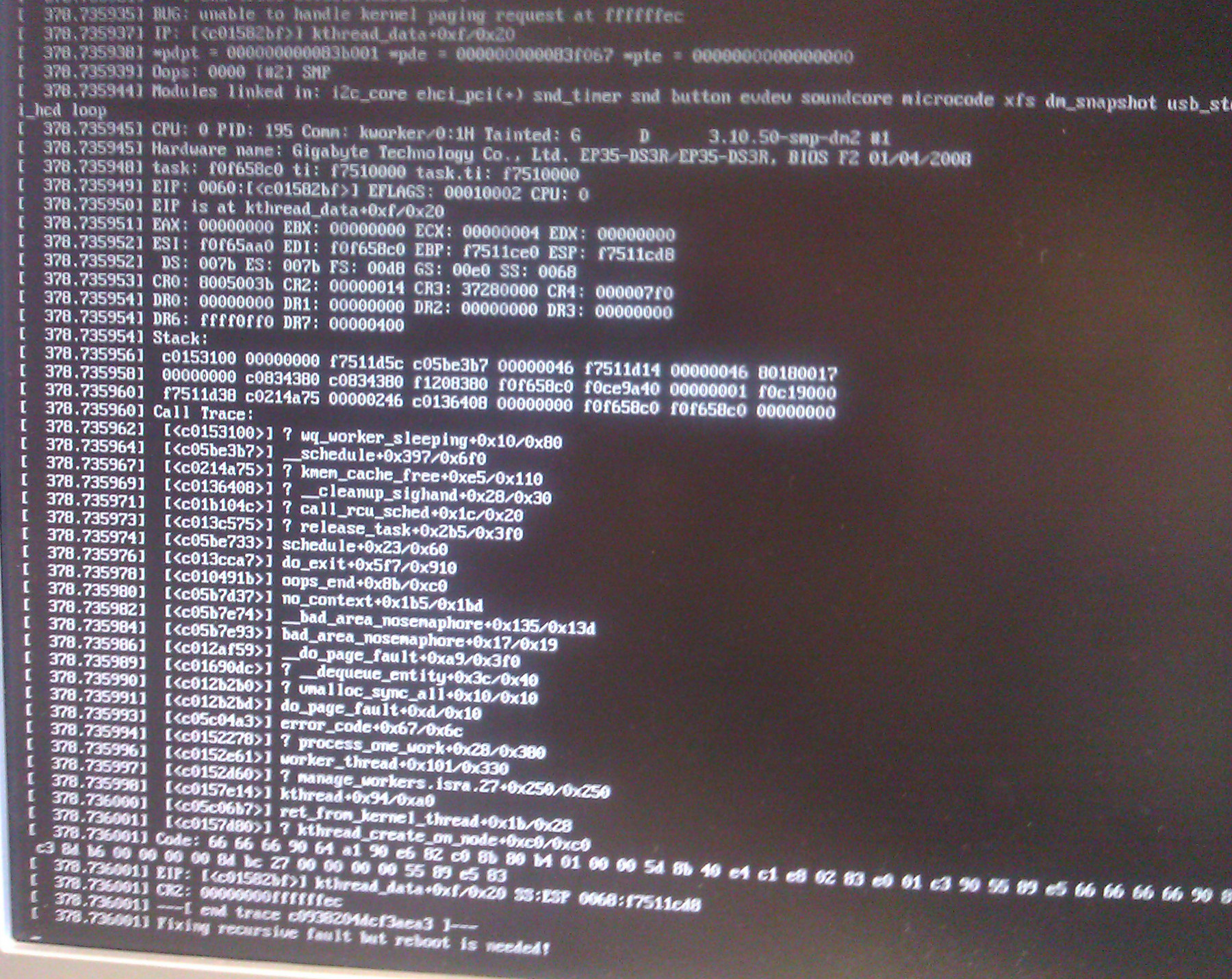
I stumbled on the solution by chance:
Include the ehci-pci module among those that are loaded at boot. That ensures the best performance for the external drive, be it a flash disc or a magnetic disc.
Because booting to a root filesystem on USB is the heart of a live USB install, it's good to know that it was a case of PEBKAC and not something more endemic.
With that fix out of the way, there are some other changes to my dm-live startup environment including following along with the stable kernel releases in the 3.10.x series. Currently, I am testing with kernel 3.10.51.
By the way, in the debug phase of this problem, I was pointed to kdump. I played around with the kexec utility to see some of the basics of kernel debugging and how it is designed to work. I found right away that the basic kernel configuration that I have been using, which is extremely similar to the basic default Slackware kernel, is configured to not generate symbols, enable boot-time reservation of memory using the parameter crashkernel=, or be arbitrarily relocatable. To use kdump there are a few changes, including adding the full compiler symbols the compiled objects. In general, I agree with Slackware's decision not to include the symbols because they increase the size of the resulting compile by a factor of 5 or 6 times. In the end, throughout my attempt to debug the above problem, I wasn't able to generate the right kind of crash, i.e. one that actually writes its crash data. I was pretty sure I was doing it right because kexec -l and kexec -e were working as expected. The panic code when loaded with kexec -p just wasn't tripped for whatever reason. It was too hard of crash, I guess.
Sunday, April 13, 2014
The following table details some of the hardware I have used in the PC era. It begins with the venerable Compaq luggable that launched the "clone" wars. I've seen a lot of hardware along the way. In the early era these brands come to mind: Everex, ALR, Northstar, Gateway 2000. Each row in the table shows what were compelling upgrade points along the path. At each step, the blazingly fast new designs left previous generations in the dust. Somehow, what had been a pleasure to use now seemed to be a chore, or too slow to bootup. What had been fast, was now painfully slow. I hope I can add benchmarks to put a mathematical value on each row. Perhaps, by comparing the next row to the previous, or some other baseline.
The genesis for making this table was XP's expiration. That didn't turn out to be as big of a deal as I thought it would. The heartbeep SSL bug made bigger news. XPs overall worldwide usage is estimated as low as 10% currently. The same estimates peg all Linux at 5%. Of course, I use Slackware Linux as my daily OS. XPs expiration forced many to upgrade to marginally better hardware, at least, for those using the Windows platform. I rolled out just over a dozen machines that use i5 CPUs. They have 16G RAM typically. That is a factor of 8 times more over the standard amount that I had incorporated at the previous level (i.e. at Core 2 E6600)
As I was finishing the rollout of the latest generation of PCs with the evolutionary step in operating systems, I had two main thoughts. First, would this be the last hurrah for desktop PCs? Will everyone demand tablets? Will Android and iOS eclipse the Microsoft juggernaut that lasted for a generation? My guess is that the days of PCs as we have known them are limited. Second, I thought how the Windows interface has gotten progressively worse. These are subjective opinions, I know. But I find that Windows 8 is not an evolutionary step that is better than Windows 7. Likewise, Windows 7's interface was worse than XP. I may be an old fogey, but give me consistency for the best productivity. These upgrades have pulled the rug out from under users for no go reason. Again, just my opinion.
| 8088 clocked @ 4.77 MHz | typ. less than 640k | 8-bit compromise of 16-bit 8086; 8087 math coprocessor optional. Used in the Compaq "Luggable". |
| 80286 | typ. 1MB, OS limited use beyond 640k | IBM "AT." These machines typically had sockets for 1 MB RAM. |
| 80386 DX @up to 20 MHz | 1MB designs still prevalent | included virtual 8086 mode; first to use 32-bit mode; still required a coprocessor for fast math functions; a very important chip. Motherboards could support 1+4MB RAM on proprietary buses. |
| 80486 DX | 4 to 8 MB RAM | upgrade to 80386 included on board math coprocessor. Rolled out in Gateway 2000 desktops. |
| Pentium | First machine outfitted with 32 MB RAM | OS: Windows NT 3.51 |
| dual Pentium Pro @200 MHz | 32 to 512 MB | dual CPUs in the "686" era kicked the Pentium's ass. OS: Windows NT 4.0 |
| Celeron w/ 128k L1 cache @800 MHz | 128 - 512 MB | budget chip in the "686" line disabled support for multi-CPU in hardware. Motherboard chipset support for SDRAM. These boards were plagued by a bad capacitor problem that caused premature failure. |
| Celeron single CPU upgrade, w/ 256k cache @1300 Mhz | 512 - 1.5 GB | Motherboard offered supported for SDRAM clocks and ecc memory |
| Pentium 4 | Ran hot compared to predecessors | |
| dual Pentium III each w/ 512k cache @up to 1400 MHz | 1 - 2 GB | dual chip configuration was good at keeping the machine responsive to the user. Path to memory was showing its age when compared to P4 designs. |
| Pentium M @up to 1870 MHz | 1 - 2 GB | First single core chip to do better than P4. Dell D610 used this chip. |
| Core Duo | 2 - 4 GB | Dual core CPU with good mobile potential. Dell D620 used the T2400. |
| Core 2 | 2 - 8 GB | 64-bit CPUs spurred the move to 64-bit OSs. E6600, E6750, etc. |
| i3 | 4 - 8 GB | 22nm architecture saves power on mobile platform. i3-3227U has 4 cores @1900 MHz |
| i5 | 16 - 32 GB | i5-3570k, i5-4670k. XP's premature expiration spurred a hardware upgrade to Windows 7, 64 bit at many offices committed to using the Microsoft platform. |
Sunday, October 20, 2013
dm-live boot environment updated for pending Slackware 14.1
Slackware 14.1 RC
Kernel: 3.10.17
BusyBox v1.20.2 (2013-06-22 00:26:51 CDT) multi-call binary.
Copyright (C) 1998-2011 Erik Andersen, Rob Landley, Denys Vlasenko and others. Licensed under GPLv2.
Packages:
- a/aaa_base-14.1-i486-1.txz
- a/aaa_elflibs-14.1-i486-3.txz
- a/aaa_terminfo-5.8-i486-1.txz
- a/bash-4.2.045-i486-1.txz
- a/bzip2-1.0.6-i486-1.txz
- a/coreutils-8.21-i486-1.txz
- a/cpio-2.11-i486-2.txz
- a/cryptsetup-1.4.3-i486-1.txz
- a/devs-2.3.1-noarch-25.txz
- a/dialog-1.2_20130523-i486-1.txz
- a/e2fsprogs-1.42.8-i486-2.txz
- a/elvis-2.2_0-i486-2.txz
- a/etc-14.1-i486-2.txz
- a/findutils-4.4.2-i486-1.txz
- a/glibc-solibs-2.17-i486-7.txz
- a/grep-2.14-i486-1.txz
- a/gzip-1.6-i486-1.txz
- a/kernel-firmware-20131008git-noarch-1.txz
- a/kmod-15-i486-1.txz
- a/lvm2-2.02.100-i486-1.txz
- a/mdadm-3.2.6-i486-1.txz
- a/mkinitrd-1.4.8-i486-1.txz
- a/pkgtools-14.1-noarch-2.tgz
- a/procps-3.2.8-i486-4.txz
- a/sed-4.2.2-i486-1.txz
- a/tar-1.26-i486-1.tgz
- a/udev-182-i486-7.txz
- a/util-linux-2.21.2-i486-6.txz
- a/which-2.20-i486-1.txz
- a/xfsprogs-3.1.11-i486-1.txz
- a/xz-5.0.5-i486-1.tgz
- l/readline-5.2-i486-4.txz
- n/gnupg-1.4.15-i486-1.txz
- n/libgcrypt-1.5.3-i486-1.txz
- n/libgpg-error-1.11-i486-1.txz
Friday, September 20, 2013
dm-live boot environment updated for pending Slackware 14.1
Slackware 14.1 beta
Kernel: 3.10.12
BusyBox v1.20.2 (2013-06-22 00:26:51 CDT) multi-call binary.
Copyright (C) 1998-2011 Erik Andersen, Rob Landley, Denys Vlasenko and others. Licensed under GPLv2.
Packages:
- a/aaa_base-14.0-i486-5.txz
- a/aaa_elflibs-14.1-i486-2.txz
- a/aaa_terminfo-5.8-i486-1.txz
- a/bash-4.2.045-i486-1.txz
- a/bzip2-1.0.6-i486-1.txz
- a/coreutils-8.21-i486-1.txz
- a/cpio-2.11-i486-2.txz
- a/cryptsetup-1.4.3-i486-1.txz
- a/devs-2.3.1-noarch-25.txz
- a/dialog-1.2_20130523-i486-1.txz
- a/e2fsprogs-1.42.8-i486-2.txz
- a/elvis-2.2_0-i486-2.txz
- a/etc-14.1-i486-1.txz
- a/findutils-4.4.2-i486-1.txz
- a/glibc-solibs-2.17-i486-7.txz
- a/grep-2.14-i486-1.txz
- a/gzip-1.6-i486-1.txz
- a/kernel-firmware-20130912git-noarch-1.txz
- a/kernel-generic-smp-3.10.12_smp-i686-1.txz
- a/kernel-modules-smp-3.10.12_smp-i686-1.txz
- a/kmod-15-i486-1.txz
- a/lvm2-2.02.100-i486-1.txz
- a/mdadm-3.2.6-i486-1.txz
- a/mkinitrd-1.4.8-i486-1.txz
- a/pkgtools-14.0-noarch-2.tgz
- a/procps-3.2.8-i486-4.txz
- a/sed-4.2.1-i486-1.txz
- a/tar-1.26-i486-1.tgz
- a/udev-182-i486-6.txz
- a/util-linux-2.21.2-i486-6.txz
- a/which-2.20-i486-1.txz
- a/xfsprogs-3.1.11-i486-1.txz
- a/xz-5.0.5-i486-1.tgz
- l/readline-5.2-i486-4.txz
- n/gnupg-1.4.14-i486-1.txz
- n/libgcrypt-1.5.3-i486-1.txz
- n/libgpg-error-1.11-i486-1.txz
- kernel itself manually removed from this image (boot element specified separately.)
- compressed the kernel modules with gzip (and depmod)
- compressed the kernel firmware into an txz archive
- compressed the /usr/share/locale directories into an txz archive.
Thursday, September 19, 2013
Friday, January 11, 2013
Monitor your UPS using a raspberry pi: apcupsd works under Slackware 14.0
This is very easily done using tools built by others. Simply compile the program using the standard drill using this Slackbuild. Install the package and modify the apcupsd config file to match the cable/communication settings to the device. You can also make an entry in /etc/rc.d/rc.local to start the service automatically at boot up, and you're good to go. Well, at least, it worked for me. I hope it works for you!
Here's the output from the command line utility:
root@rp-1:~#: apcupsd status

APC      : 001,036,0903
DATE     : 2013-01-11 09:39:55 -0700
HOSTNAME : rp-1
VERSION  : 3.14.10 (13 September 2011) slackware
UPSNAME  : rp-1
CABLE    : USB Cable
DRIVER   : USB UPS Driver
UPSMODE  : Stand Alone
STARTTIME: 2013-01-11 09:38:58 -0700
MODEL    : Back-UPS XS 1200
STATUS   : ONLINE
LINEV    : 120.0 Volts
LOADPCT  :  12.0 Percent Load Capacity
BCHARGE  : 100.0 Percent
TIMELEFT :  99.8 Minutes
MBATTCHG : 5 Percent
MINTIMEL : 3 Minutes
MAXTIME  : 0 Seconds
SENSE    : Medium
LOTRANS  : 097.0 Volts
HITRANS  : 139.0 Volts
ALARMDEL : 30 seconds
BATTV    : 27.1 Volts
LASTXFER : Automatic or explicit self test
NUMXFERS : 0
TONBATT  : 0 seconds
CUMONBATT: 0 seconds
XOFFBATT : N/A
SELFTEST : NO
STATFLAG : 0x07000008 Status Flag
SERIALNO : JB0609014887
BATTDATE : 2006-02-22
NOMINV   : 120 Volts
NOMBATTV :  24.0 Volts
NOMPOWER : 780 Watts
FIRMWARE : 8.g1 .D USB FW:g1
END APC  : 2013-01-11 09:39:55 -0700
Tuesday, January 8, 2013
A nice Windows hack: Substitute the bash shell to replace CMD
Going back to the Windows command line is always a painful experience. The pain is only magnified if you're used to using a unix shell, like bash. Luckily, relief is available via a free download and a Windows registry hack.
First, you'll need a replacement shell. There are a few available. I tested two.
- Win-Bash This is a very lightweight tool. It only requires 13M of disk space and there are about 120 files with many standard utilities included. This setup ended up being much more capable than I had originally thought. Even though the bash version offered is several years old, it may be enough to meet your needs. Personally, I opted for a more comprehensive solution, below...
- cygwin This is a large set of unix/linux applications that have been ported to the Windows environment. It can be installed piecemeal, and the base environment includes several shell options, including bash. The downside is that the basic install requires about 100M of disk space.
To add a final piece to the puzzle, and make executing the shell much more convenient, you'll need to tweak the Windows workstation a little bit. After installing the bash-capable environment of your choice, the next step is to create a batch file and tweak some registry settings. When these fixes are in place, it will enable you to invoke bash using the standard right-click menu context.
Create a startup batch file, my_bash.bat
@echo off
cd /D "%1"
SHELL=c:\cygwin\bin\bash.exe
PATH=c:\cygwin\bin;%PATH%
bash -i
Navigate to the proper position into the registry (caution! whenever fiddling with the registry!) using the registry editing tool of your choice:
\My Computer\HKEY_LOCAL_MACHINE\SOFTWARE\Classes\Folder\shell
Add a new key using a descriptive name for the environment you've chosen. I installed both and chose win-bash and cygwin
Note that the value of default REG_SZ key assigns the name that will be shown in the right-click menu.
Next, add one more subkey below that new key:
\My Computer\HKEY_LOCAL_MACHINE\SOFTWARE\Classes\Folder\shell\cygwin\Command
The default REG_SZ for this subkey is the code that is executed. Link this to the batch file.
cmd /c c:\cygwin\my_bash.bat "%1"
Voila! Test it using the Windows explorer shell.
After this environment is installed other bonus factors can start to accumulate, too. You can start writing simple bash scripts to automate common Windows tasks, or not. In any case, the unix scripting language(s) offers much more robust and consistent environment(s) for getting things done. If that were not incentive enough all by itself, here are some other things that I have tested as working, too. You'll need to install more than the base layer of cygwin, though.
- networking components. I installed ssh with heimdahl kerberos. That enables ssh sessions to be authenticated by active directory, i.e. without entering a passowrd.
- gnu compiler tools. Now, you can compile your standard C/C++ code that will execute under Windows without having the Microsoft tools.
- X11. Run remote X-applications!
As you can see, although I've only scratched the surface here, the Windows environment can be made more comfortable for those used to running Linux! Cygwin is the key.
edited: 2013-08-30, fix registry pathMonday, December 31, 2012
Leafpad is a good default editor for Slackware 14.0, including for raspberry pi
The basic graphical text editor, mousepad, has recently been removed from Slackware in favor of gvim. Personally, that is not my favorite editor. I found that mousepad was actually a derivative of leafpad-- so why not use that instead? A slackbuild is available for Slackware 14.0 here. Also, of note, the same slackbuild works without modification to compile the same source for ARM architecture. The resulting package is compiled and installed using the standard drill. For example, after compiling the package directly on the raspberry pi device, install the package:
# installpkg /tmp/leafpad-0.8.18.1-arm-1_SBo.tgzThe package works natively, but the raspberry pi architecture is a bit challenged by running a full blown X. A leaner alternative is to revert to X-applications forwarded over ssh. To do that configure your ssh server to allow X-apps to be forwarded. In the file, /etc/ssh/sshd_config modify one line:
X11Forwarding yesThen restart the daemon:
# /etc/rc.d/rc.sshd restart
You can now login from a remote host, and start leafpad:
$ ssh -Y doug@192.168.1.100
doug@rp-1:~$ leafpad &
This will allow you to edit remote files on the remote computer, the raspberry pi in this instance.
Here is a somewhat fudged screenshot.
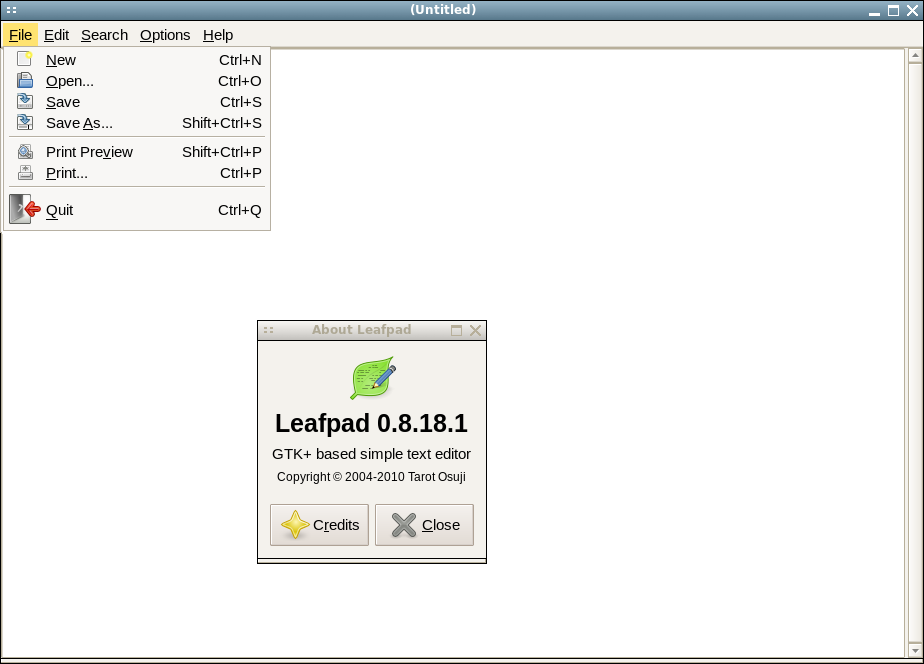
Thursday, August 16, 2012
dm-live updated to Slackware -current (v14 release pending)
Slackware 14's release is almost finished. PV marked the latest set of changes as RC2. I looked at my startup environment to see what changes were necessary to prepare to match the next release. Almost all of the packages were updated and module-init-tools was removed in favor of kmod. The busybox toolset that is used for a lot of commands was upgraded, with a few minor additions (lsof, setserial, udhcpc6). Here is the version info:
BusyBox v1.20.1 (2012-07-17 17:49:41 CDT) multi-call binary.
Copyright (C) 1998-2011 Erik Andersen, Rob Landley, Denys Vlasenko
Here is my list of packages, omitting the kernel, kernel modules, and kernel firmware:
- slackware/a/aaa_base-14.0-i486-4.txz
- slackware/a/aaa_elflibs-14.0-i486-3.txz
- slackware/a/aaa_terminfo-5.8-i486-1.txz
- slackware/a/bash-4.2.037-i486-1.txz
- slackware/a/bzip2-1.0.6-i486-1.txz
- slackware/a/coreutils-8.18-i486-1.txz
- slackware/a/cpio-2.11-i486-1.txz
- slackware/a/cryptsetup-1.4.3-i486-1.txz
- slackware/a/devs-2.3.1-noarch-25.txz
- slackware/a/dialog-1.1_20100428-i486-2.txz
- slackware/a/e2fsprogs-1.42.4-i486-1.txz
- slackware/a/elvis-2.2_0-i486-2.txz
- slackware/a/etc-13.013-i486-2.txz
- slackware/a/findutils-4.4.2-i486-1.txz
- slackware/a/glibc-solibs-2.15-i486-4.txz
- slackware/a/grep-2.13-i486-2.txz
- slackware/a/gzip-1.5-i486-1.txz
- slackware/a/kmod-9-i486-3.txz
- slackware/a/lvm2-2.02.96-i486-4.txz
- slackware/a/mdadm-3.2.5-i486-1.txz
- slackware/a/mkinitrd-1.4.7-i486-4.txz
- slackware/a/pkgtools-14.0-noarch-1.tgz
- slackware/a/procps-3.2.8-i486-3.txz
- slackware/a/sed-4.2.1-i486-1.txz
- slackware/a/tar-1.26-i486-1.tgz
- slackware/a/udev-182-i486-3.txz
- slackware/a/util-linux-2.21.2-i486-5.txz
- slackware/a/which-2.20-i486-1.txz
- slackware/a/xfsprogs-3.1.8-i486-1.txz
- slackware/a/xz-5.0.4-i486-1.tgz
- slackware/l/readline-5.2-i486-4.txz
- slackware/n/gnupg-1.4.12-i486-1.txz
- slackware/n/libgcrypt-1.5.0-i486-1.txz
- slackware/n/libgpg-error-1.10-i486-1.txz
- slackware/a/aaa_terminfo-5.8-i486-1.txz
- slackware/a/bzip2-1.0.6-i486-1.txz
- slackware/a/cpio-2.11-i486-1.txz
- slackware/a/devs-2.3.1-noarch-25.txz
- slackware/a/dialog-1.1_20100428-i486-2.txz
- slackware/a/elvis-2.2_0-i486-2.txz
- slackware/a/findutils-4.4.2-i486-1.txz
- slackware/a/procps-3.2.8-i486-3.txz
- slackware/a/sed-4.2.1-i486-1.txz
- slackware/a/tar-1.26-i486-1.tgz
- slackware/a/which-2.20-i486-1.txz
- slackware/l/readline-5.2-i486-4.txz
I have been using this as part of my working day-to-day setup for over a year now. It's a good rescue and all purpose startup environment. That includes booting to an encrypted root filesystem, booting to root filesystem on external USB, or the combination: encrypted root filesystem on external USB device. USB flash memory devices are now hitting the 32 GB level at affordable prices. I've noticed some performance issues on the larger flash disks that are not present on external magnetic USB drives. Another problem have been several glitches introduced with changes to the Linux kernel itself in the past year. The glitches manifest differently on different hardware. I am using kernel version 3.2.26 on an Intel Atom CPU powered netbook, and that combination has had the fewest glitches. I will probably update to PV's 3.2.27 kernel soon and try to use lzma compressed modules to see if any slight gains in free space can be made. That said, the gains are extremely marginal on today's hardware because I don't use computers with less than 256MB anymore. Also, the gains are transient because the environment is discarded when the startup environment gives control to the actual root filesystem.
Update: 2012-08-18: PV's kernel for 3.2.27 has a significantly larger firmware footprint than what I had been using. It jumps to 45M from 12M. I did some simple comparisons to look for differences. I found a direct overlap of 8M and the rest different. These are the biggest directories in the firmware packaged by PV:
6.5M ./ti-connectivity
4.8M ./bnx2x
2.2M ./libertas
1.6M ./brcm
2.2M ./ueagle-atm
1.5M ./bnx2
Saturday, April 28, 2012
Cut Slackware some slack...
This recent Slashdot headline noted there was some recent downtime at Slackware.com, 
Oh, one other thing, allow me to point out one fact about Slackware's perceived lack of popularity. Why does it appear to shine less brightly than the newer, and perceived rising stars of the Linux world? Well, for one thing, it does have a learning curve. That means it can be off-putting to some. However, once it is mastered, it provides the basis for a lean, mean, fighting machine! It is deployed in quantity by people in the know. For example, at some of the linux conferences I have attended, a few devout followers from certain industries, governments, etc. where stability is a primary asset have stated it is their primary go-to tool. And for what it's worth, those agencies may not desire to have their deployments counted.
Saturday, March 17, 2012
Herbert Vetoes HB363, the Anti-Sex Ed Bill!
This was a big surprise, given that Gail Ruzika had invested so much lobbying effort to get the bill passed. The Eagle Forum (also known as the anti-sex league) must be crying in their Cheerios this morning.
It was refreshing Herbert stood up for the majority's view, and didn't pander to the ultra-right. Too bad, he didn't show the same courage last year. He should have vetoed the bill designating an official firearm, the 45 caliber long-slide, last year.
Wednesday, March 7, 2012
On Point: Interview with special effects artist Douglas Trumball
NPR: Fukushima Anniversary Discussions
Monday's On Point was a very interesting discussion. There is a real possibility that Japan will mothball all of its nuclear power because the risk the industry poses to all of Japan had been previously underestimated. Download audio.
Likewise, last Tuesday's Fresh Air. Download audio. This is an interview with Dan Edge, the producer of a Frontline documentary about the disaster.
Wednesday, February 1, 2012
On Point Discussion: New web privacy policies at Facebook and Google
Today's On Point discusses how both Facebook and Google are changing their privacy policies. They discuss the pros and cons of these changes and completely new offerings. New to the Google mix is the Android phone penetration, which enables phone providers and Google to gather geographic and on-the-spot information.
Download mp3 audio
Audio split into 4 parts:
1.
2.
3.
4.
Download mp3 audio
Audio split into 4 parts:
1.
2.
3.
4.
Fresh Air: Baratunde Thurston
Subscribe to:
Posts (Atom)