Sunday, October 20, 2013

dm-live boot environment updated for pending Slackware 14.1

Slackware 14.1 RC Kernel: 3.10.17
BusyBox v1.20.2 (2013-06-22 00:26:51 CDT) multi-call binary.
Copyright (C) 1998-2011 Erik Andersen, Rob Landley, Denys Vlasenko and others. Licensed under GPLv2.
Packages:
  • a/aaa_base-14.1-i486-1.txz
  • a/aaa_elflibs-14.1-i486-3.txz
  • a/aaa_terminfo-5.8-i486-1.txz
  • a/bash-4.2.045-i486-1.txz
  • a/bzip2-1.0.6-i486-1.txz
  • a/coreutils-8.21-i486-1.txz
  • a/cpio-2.11-i486-2.txz
  • a/cryptsetup-1.4.3-i486-1.txz
  • a/devs-2.3.1-noarch-25.txz
  • a/dialog-1.2_20130523-i486-1.txz
  • a/e2fsprogs-1.42.8-i486-2.txz
  • a/elvis-2.2_0-i486-2.txz
  • a/etc-14.1-i486-2.txz
  • a/findutils-4.4.2-i486-1.txz
  • a/glibc-solibs-2.17-i486-7.txz
  • a/grep-2.14-i486-1.txz
  • a/gzip-1.6-i486-1.txz
  • a/kernel-firmware-20131008git-noarch-1.txz
  • a/kmod-15-i486-1.txz
  • a/lvm2-2.02.100-i486-1.txz
  • a/mdadm-3.2.6-i486-1.txz
  • a/mkinitrd-1.4.8-i486-1.txz
  • a/pkgtools-14.1-noarch-2.tgz
  • a/procps-3.2.8-i486-4.txz
  • a/sed-4.2.2-i486-1.txz
  • a/tar-1.26-i486-1.tgz
  • a/udev-182-i486-7.txz
  • a/util-linux-2.21.2-i486-6.txz
  • a/which-2.20-i486-1.txz
  • a/xfsprogs-3.1.11-i486-1.txz
  • a/xz-5.0.5-i486-1.tgz
  • l/readline-5.2-i486-4.txz
  • n/gnupg-1.4.15-i486-1.txz
  • n/libgcrypt-1.5.3-i486-1.txz
  • n/libgpg-error-1.11-i486-1.txz

Friday, September 20, 2013

dm-live boot environment updated for pending Slackware 14.1

Slackware 14.1 beta Kernel: 3.10.12
BusyBox v1.20.2 (2013-06-22 00:26:51 CDT) multi-call binary.
Copyright (C) 1998-2011 Erik Andersen, Rob Landley, Denys Vlasenko and others. Licensed under GPLv2.
Packages:
  • a/aaa_base-14.0-i486-5.txz
  • a/aaa_elflibs-14.1-i486-2.txz
  • a/aaa_terminfo-5.8-i486-1.txz
  • a/bash-4.2.045-i486-1.txz
  • a/bzip2-1.0.6-i486-1.txz
  • a/coreutils-8.21-i486-1.txz
  • a/cpio-2.11-i486-2.txz
  • a/cryptsetup-1.4.3-i486-1.txz
  • a/devs-2.3.1-noarch-25.txz
  • a/dialog-1.2_20130523-i486-1.txz
  • a/e2fsprogs-1.42.8-i486-2.txz
  • a/elvis-2.2_0-i486-2.txz
  • a/etc-14.1-i486-1.txz
  • a/findutils-4.4.2-i486-1.txz
  • a/glibc-solibs-2.17-i486-7.txz
  • a/grep-2.14-i486-1.txz
  • a/gzip-1.6-i486-1.txz
  • a/kernel-firmware-20130912git-noarch-1.txz
  • a/kernel-generic-smp-3.10.12_smp-i686-1.txz
  • a/kernel-modules-smp-3.10.12_smp-i686-1.txz
  • a/kmod-15-i486-1.txz
  • a/lvm2-2.02.100-i486-1.txz
  • a/mdadm-3.2.6-i486-1.txz
  • a/mkinitrd-1.4.8-i486-1.txz
  • a/pkgtools-14.0-noarch-2.tgz
  • a/procps-3.2.8-i486-4.txz
  • a/sed-4.2.1-i486-1.txz
  • a/tar-1.26-i486-1.tgz
  • a/udev-182-i486-6.txz
  • a/util-linux-2.21.2-i486-6.txz
  • a/which-2.20-i486-1.txz
  • a/xfsprogs-3.1.11-i486-1.txz
  • a/xz-5.0.5-i486-1.tgz
  • l/readline-5.2-i486-4.txz
  • n/gnupg-1.4.14-i486-1.txz
  • n/libgcrypt-1.5.3-i486-1.txz
  • n/libgpg-error-1.11-i486-1.txz
I also tweaked the installed packages to save some space:
  • kernel itself manually removed from this image (boot element specified separately.)
  • compressed the kernel modules with gzip (and depmod)
  • compressed the kernel firmware into an txz archive
  • compressed the /usr/share/locale directories into an txz archive.
If the locale or firmware directories are needed during the boot process for whatever reason, they can be expanded from within the working environment. The basic initrd uses about 134M when expanded with these optimizations. Expanding the locale and kernel firmware requires 189M.

Thursday, September 19, 2013

Install Windows 7 from USB

I wanted to bookmark this post that I found online.

Friday, January 11, 2013

Monitor your UPS using a raspberry pi: apcupsd works under Slackware 14.0

This is very easily done using tools built by others. Simply compile the program using the standard drill using this Slackbuild. Install the package and modify the apcupsd config file to match the cable/communication settings to the device. You can also make an entry in /etc/rc.d/rc.local to start the service automatically at boot up, and you're good to go. Well, at least, it worked for me. I hope it works for you!

Here's the output from the command line utility:

root@rp-1:~#: apcupsd status

APC      : 001,036,0903
DATE     : 2013-01-11 09:39:55 -0700  
HOSTNAME : rp-1
VERSION  : 3.14.10 (13 September 2011) slackware
UPSNAME  : rp-1
CABLE    : USB Cable
DRIVER   : USB UPS Driver
UPSMODE  : Stand Alone
STARTTIME: 2013-01-11 09:38:58 -0700  
MODEL    : Back-UPS XS 1200 
STATUS   : ONLINE 
LINEV    : 120.0 Volts
LOADPCT  :  12.0 Percent Load Capacity
BCHARGE  : 100.0 Percent
TIMELEFT :  99.8 Minutes
MBATTCHG : 5 Percent
MINTIMEL : 3 Minutes
MAXTIME  : 0 Seconds
SENSE    : Medium
LOTRANS  : 097.0 Volts
HITRANS  : 139.0 Volts
ALARMDEL : 30 seconds
BATTV    : 27.1 Volts
LASTXFER : Automatic or explicit self test
NUMXFERS : 0
TONBATT  : 0 seconds
CUMONBATT: 0 seconds
XOFFBATT : N/A
SELFTEST : NO
STATFLAG : 0x07000008 Status Flag
SERIALNO : JB0609014887  
BATTDATE : 2006-02-22
NOMINV   : 120 Volts
NOMBATTV :  24.0 Volts
NOMPOWER : 780 Watts
FIRMWARE : 8.g1 .D USB FW:g1 
END APC  : 2013-01-11 09:39:55 -0700  

Tuesday, January 8, 2013

A nice Windows hack: Substitute the bash shell to replace CMD

Going back to the Windows command line is always a painful experience. The pain is only magnified if you're used to using a unix shell, like bash. Luckily, relief is available via a free download and a Windows registry hack.

First, you'll need a replacement shell. There are a few available. I tested two.

  • Win-Bash This is a very lightweight tool. It only requires 13M of disk space and there are about 120 files with many standard utilities included. This setup ended up being much more capable than I had originally thought. Even though the bash version offered is several years old, it may be enough to meet your needs. Personally, I opted for a more comprehensive solution, below...
  • cygwin This is a large set of unix/linux applications that have been ported to the Windows environment. It can be installed piecemeal, and the base environment includes several shell options, including bash. The downside is that the basic install requires about 100M of disk space.

To add a final piece to the puzzle, and make executing the shell much more convenient, you'll need to tweak the Windows workstation a little bit. After installing the bash-capable environment of your choice, the next step is to create a batch file and tweak some registry settings. When these fixes are in place, it will enable you to invoke bash using the standard right-click menu context.

Create a startup batch file, my_bash.bat

@echo off
cd /D "%1"
SHELL=c:\cygwin\bin\bash.exe
PATH=c:\cygwin\bin;%PATH%
bash -i

Navigate to the proper position into the registry (caution! whenever fiddling with the registry!) using the registry editing tool of your choice:

\My Computer\HKEY_LOCAL_MACHINE\SOFTWARE\Classes\Folder\shell

Add a new key using a descriptive name for the environment you've chosen. I installed both and chose win-bash and cygwin

Note that the value of default REG_SZ key assigns the name that will be shown in the right-click menu.

Next, add one more subkey below that new key:

\My Computer\HKEY_LOCAL_MACHINE\SOFTWARE\Classes\Folder\shell\cygwin\Command

The default REG_SZ for this subkey is the code that is executed. Link this to the batch file.


cmd /c c:\cygwin\my_bash.bat "%1"

Voila! Test it using the Windows explorer shell.

After this environment is installed other bonus factors can start to accumulate, too. You can start writing simple bash scripts to automate common Windows tasks, or not. In any case, the unix scripting language(s) offers much more robust and consistent environment(s) for getting things done. If that were not incentive enough all by itself, here are some other things that I have tested as working, too. You'll need to install more than the base layer of cygwin, though.

  • networking components. I installed ssh with heimdahl kerberos. That enables ssh sessions to be authenticated by active directory, i.e. without entering a passowrd.
  • gnu compiler tools. Now, you can compile your standard C/C++ code that will execute under Windows without having the Microsoft tools.
  • X11. Run remote X-applications!

As you can see, although I've only scratched the surface here, the Windows environment can be made more comfortable for those used to running Linux! Cygwin is the key.

edited: 2013-08-30, fix registry path

Monday, December 31, 2012

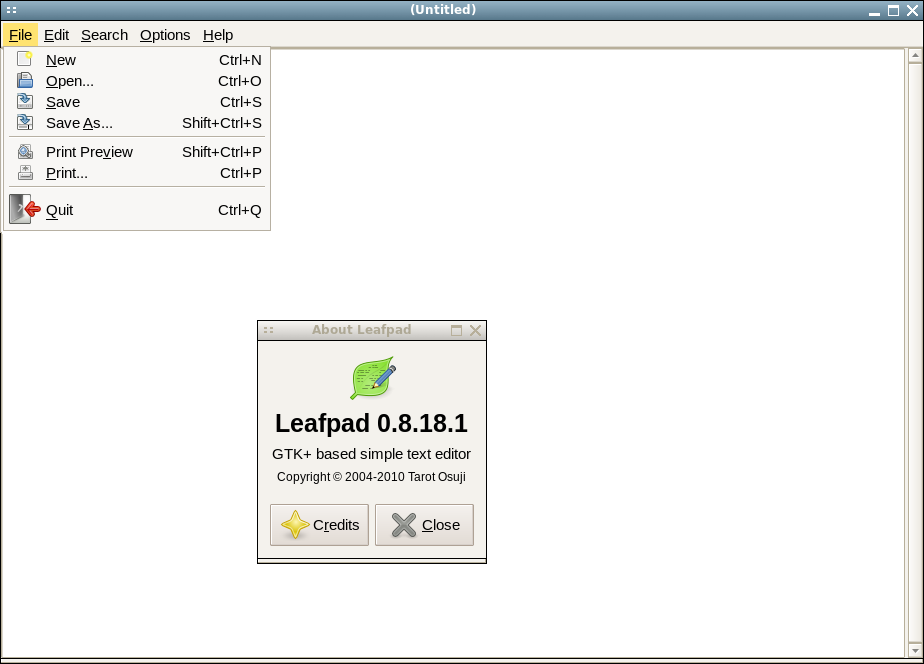
Leafpad is a good default editor for Slackware 14.0, including for raspberry pi

The basic graphical text editor, mousepad, has recently been removed from Slackware in favor of gvim. Personally, that is not my favorite editor. I found that mousepad was actually a derivative of leafpad-- so why not use that instead? A slackbuild is available for Slackware 14.0 here. Also, of note, the same slackbuild works without modification to compile the same source for ARM architecture. The resulting package is compiled and installed using the standard drill. For example, after compiling the package directly on the raspberry pi device, install the package:

# installpkg /tmp/leafpad-0.8.18.1-arm-1_SBo.tgz

The package works natively, but the raspberry pi architecture is a bit challenged by running a full blown X. A leaner alternative is to revert to X-applications forwarded over ssh. To do that configure your ssh server to allow X-apps to be forwarded. In the file, /etc/ssh/sshd_config modify one line:

X11Forwarding yes

Then restart the daemon:

# /etc/rc.d/rc.sshd restart

You can now login from a remote host, and start leafpad:

$ ssh -Y doug@192.168.1.100

doug@rp-1:~$ leafpad &

This will allow you to edit remote files on the remote computer, the raspberry pi in this instance.

Here is a somewhat fudged screenshot.

Thursday, August 16, 2012

dm-live updated to Slackware -current (v14 release pending)

Slackware 14's release is almost finished. PV marked the latest set of changes as RC2. I looked at my startup environment to see what changes were necessary to prepare to match the next release. Almost all of the packages were updated and module-init-tools was removed in favor of kmod. The busybox toolset that is used for a lot of commands was upgraded, with a few minor additions (lsof, setserial, udhcpc6). Here is the version info:
BusyBox v1.20.1 (2012-07-17 17:49:41 CDT) multi-call binary.
Copyright (C) 1998-2011 Erik Andersen, Rob Landley, Denys Vlasenko
Here is my list of packages, omitting the kernel, kernel modules, and kernel firmware:
  • slackware/a/aaa_base-14.0-i486-4.txz
  • slackware/a/aaa_elflibs-14.0-i486-3.txz
  • slackware/a/aaa_terminfo-5.8-i486-1.txz
  • slackware/a/bash-4.2.037-i486-1.txz
  • slackware/a/bzip2-1.0.6-i486-1.txz
  • slackware/a/coreutils-8.18-i486-1.txz
  • slackware/a/cpio-2.11-i486-1.txz
  • slackware/a/cryptsetup-1.4.3-i486-1.txz
  • slackware/a/devs-2.3.1-noarch-25.txz
  • slackware/a/dialog-1.1_20100428-i486-2.txz
  • slackware/a/e2fsprogs-1.42.4-i486-1.txz
  • slackware/a/elvis-2.2_0-i486-2.txz
  • slackware/a/etc-13.013-i486-2.txz
  • slackware/a/findutils-4.4.2-i486-1.txz
  • slackware/a/glibc-solibs-2.15-i486-4.txz
  • slackware/a/grep-2.13-i486-2.txz
  • slackware/a/gzip-1.5-i486-1.txz
  • slackware/a/kmod-9-i486-3.txz
  • slackware/a/lvm2-2.02.96-i486-4.txz
  • slackware/a/mdadm-3.2.5-i486-1.txz
  • slackware/a/mkinitrd-1.4.7-i486-4.txz
  • slackware/a/pkgtools-14.0-noarch-1.tgz
  • slackware/a/procps-3.2.8-i486-3.txz
  • slackware/a/sed-4.2.1-i486-1.txz
  • slackware/a/tar-1.26-i486-1.tgz
  • slackware/a/udev-182-i486-3.txz
  • slackware/a/util-linux-2.21.2-i486-5.txz
  • slackware/a/which-2.20-i486-1.txz
  • slackware/a/xfsprogs-3.1.8-i486-1.txz
  • slackware/a/xz-5.0.4-i486-1.tgz
  • slackware/l/readline-5.2-i486-4.txz
  • slackware/n/gnupg-1.4.12-i486-1.txz
  • slackware/n/libgcrypt-1.5.0-i486-1.txz
  • slackware/n/libgpg-error-1.10-i486-1.txz
Only these packages from the startup environment based on version 13.37 were not upgraded:
  • slackware/a/aaa_terminfo-5.8-i486-1.txz
  • slackware/a/bzip2-1.0.6-i486-1.txz
  • slackware/a/cpio-2.11-i486-1.txz
  • slackware/a/devs-2.3.1-noarch-25.txz
  • slackware/a/dialog-1.1_20100428-i486-2.txz
  • slackware/a/elvis-2.2_0-i486-2.txz
  • slackware/a/findutils-4.4.2-i486-1.txz
  • slackware/a/procps-3.2.8-i486-3.txz
  • slackware/a/sed-4.2.1-i486-1.txz
  • slackware/a/tar-1.26-i486-1.tgz
  • slackware/a/which-2.20-i486-1.txz
  • slackware/l/readline-5.2-i486-4.txz
The 34 listed packages use approximately 89 MB of RAM when expanded. The gzipped kernel modules use 43 MB and the kernel firmware uses 12 MB for a total of approximately 144 MB. For practical purposes, a machine with 256 MB is the least amount that could be used to successfully load the startup environment. A couple of small optimizations could reduce the required space slightly (1. compress /usr/share/locale, remove redundant copy of busybox in mkinitrd - or remove the package).

I have been using this as part of my working day-to-day setup for over a year now. It's a good rescue and all purpose startup environment. That includes booting to an encrypted root filesystem, booting to root filesystem on external USB, or the combination: encrypted root filesystem on external USB device. USB flash memory devices are now hitting the 32 GB level at affordable prices. I've noticed some performance issues on the larger flash disks that are not present on external magnetic USB drives. Another problem have been several glitches introduced with changes to the Linux kernel itself in the past year. The glitches manifest differently on different hardware. I am using kernel version 3.2.26 on an Intel Atom CPU powered netbook, and that combination has had the fewest glitches. I will probably update to PV's 3.2.27 kernel soon and try to use lzma compressed modules to see if any slight gains in free space can be made. That said, the gains are extremely marginal on today's hardware because I don't use computers with less than 256MB anymore. Also, the gains are transient because the environment is discarded when the startup environment gives control to the actual root filesystem.

Update: 2012-08-18: PV's kernel for 3.2.27 has a significantly larger firmware footprint than what I had been using. It jumps to 45M from 12M. I did some simple comparisons to look for differences. I found a direct overlap of 8M and the rest different. These are the biggest directories in the firmware packaged by PV:

6.5M ./ti-connectivity
4.8M ./bnx2x
2.2M ./libertas
1.6M ./brcm
2.2M ./ueagle-atm
1.5M ./bnx2