Monday, January 24, 2011
RAID 1 with offline elements
I created this webpage and submitted it for comments at comp.os.linux.misc.

Thursday, January 20, 2011
On Point : Stuxnet
Yesterday's On Point discussed the Stuxnet worm. The guests were very much in favor of deploying the worm, and weren't shying away from calling it a weapon of war. They thought that it was a good alternative to a physical attack (airstrike). A few callers questioned the attack on the grounds that we have no declaration of war against Iran and that the attack was a covert operation. The host pointed out that the recipient of the attack can reverse engineer the "bomb," and potentially point it back at us. At least one caller amplified that theme. The guests responded that we are already under attack daily, and that we better be prepared for threats that can emerge very quickly. This kind of cyber attack may not be confined to computer networks. For example, one of the guests mentioned that enemies have surveyed our electrical grid for vulnerabilities. If I remember correctly, the Y2k disaster scenarios included failure of certain types of programmable controllers, perhaps similar to the ones targeted by Stuxnet, that are widely deployed in all kinds of industrial settings.
The stuxnet worm included four different attack scenarios using four different Windows zero day bugs. To me it seems that is a real grey area. The white-hat security researchers look for bugs in order to fix the OS; black hats find holes that they can exploit for profit. The "gray hats" are apparently at work finding holes that they can exploit to harm enemies.
Here is a link to the discussion.
Update: 2011-01-26
Slashdot reported recently that cybercriminals are finding that Windows is "tapped out" and are gearing up to attack other platforms. Whether that is really true, or not is debatable. (My WAG is that the Windows field is still ripe and there are easy pickins' for the taking.) However, others have already noted that a successful attack against unix (and its variants) would definitely be worth something to bad guys because the core of online sites are hosted on a unix-variant platform.
I thought this AC comment was on the mark.
Update: 2011-03-15
On the Media picked up the discussion. The point is made that it is "Hiroshima moment" in warfare. Stuxnet is a new type of weapon that was developed to target a specific enemy. It is the first salvo in the age of cyber-warfare.
The stuxnet worm included four different attack scenarios using four different Windows zero day bugs. To me it seems that is a real grey area. The white-hat security researchers look for bugs in order to fix the OS; black hats find holes that they can exploit for profit. The "gray hats" are apparently at work finding holes that they can exploit to harm enemies.
Here is a link to the discussion.
Update: 2011-01-26
Slashdot reported recently that cybercriminals are finding that Windows is "tapped out" and are gearing up to attack other platforms. Whether that is really true, or not is debatable. (My WAG is that the Windows field is still ripe and there are easy pickins' for the taking.) However, others have already noted that a successful attack against unix (and its variants) would definitely be worth something to bad guys because the core of online sites are hosted on a unix-variant platform.
I thought this AC comment was on the mark.
Update: 2011-03-15
On the Media picked up the discussion. The point is made that it is "Hiroshima moment" in warfare. Stuxnet is a new type of weapon that was developed to target a specific enemy. It is the first salvo in the age of cyber-warfare.
Thursday, January 6, 2011
File Deduplication in bash
I submitted this script for comments to comp.os.linux.misc
Update: 2011-02-11
I added a feature that for files to be considered for more checking both the file name and file size must match exactly. Here is the latest version.
Update: 2011-02-11
I added a feature that for files to be considered for more checking both the file name and file size must match exactly. Here is the latest version.
Sunday, January 2, 2011
Russian Government Mandates GNU/Linux
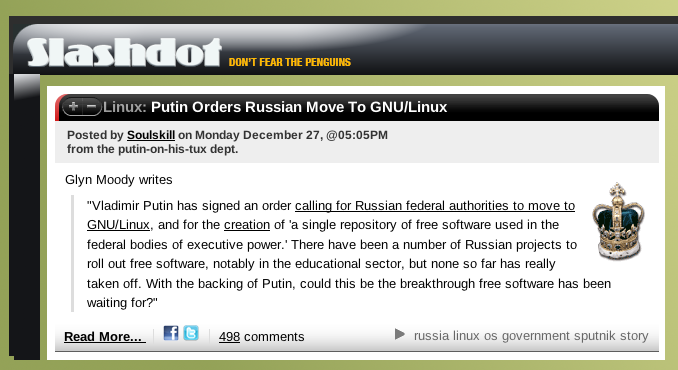
Russia is the latest government to initiate the switch to GNU/Linux. They follow after China and Cuba. There have been other governmental mandates which have had varied success and staying power. Here is Slashdot's
 headline.
There needs to be some commitment to stick with it because there can be some pain during the transition period. Users may push back when pushed away from their comfort zone. They are more likely to stick with it if they know there is a payoff in the end. For example, they could have the incentive of keeping their jobs because they know their salaries are in part paid for by capturing the Microsoft tax. Some of the cynical comments on the Slashdot posting also hit the nail on the head. They guessed that Vladimir Putin could be posturing for a big discount from Microsoft by just threatening to move to GNU/Linux. That could certainly be true, and the monopolist is likely to comply with a cost incentive. However, if Russia doesn't follow through, it will be too bad. GNU/Linux is certainly very usable as a desktop and server OS at this point, not to mention its resounding success and acceptance on Android devices. Big government backing could be the final piece of the puzzle to break the monopolist's agenda to maintain its predatory price structure.
 headline.
There needs to be some commitment to stick with it because there can be some pain during the transition period. Users may push back when pushed away from their comfort zone. They are more likely to stick with it if they know there is a payoff in the end. For example, they could have the incentive of keeping their jobs because they know their salaries are in part paid for by capturing the Microsoft tax. Some of the cynical comments on the Slashdot posting also hit the nail on the head. They guessed that Vladimir Putin could be posturing for a big discount from Microsoft by just threatening to move to GNU/Linux. That could certainly be true, and the monopolist is likely to comply with a cost incentive. However, if Russia doesn't follow through, it will be too bad. GNU/Linux is certainly very usable as a desktop and server OS at this point, not to mention its resounding success and acceptance on Android devices. Big government backing could be the final piece of the puzzle to break the monopolist's agenda to maintain its predatory price structure.
Tuesday, December 28, 2010
DIY: Slackware on USB Flash (8G)
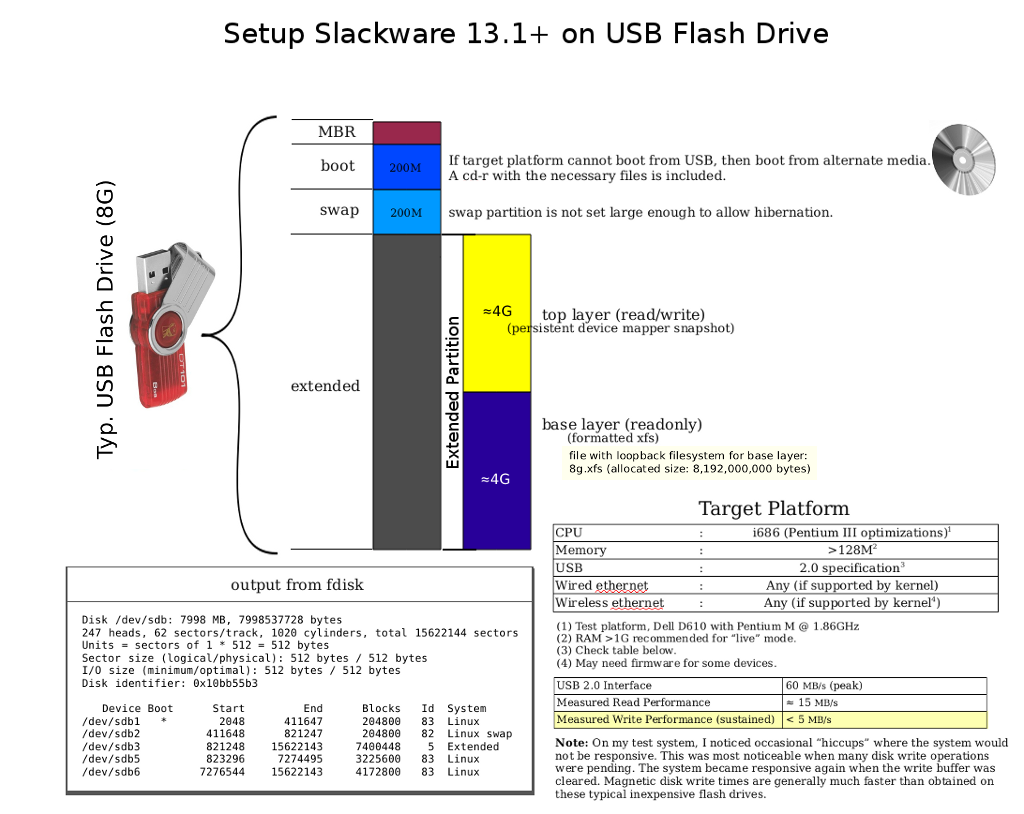
As mentioned in my previous post, it is possible to use an 8G flash drive, instead of the larger (and pricier) 16G version.
Misc. Notes
This layout still gives the option to boot into one of two modes: either the live mode where changes are written to RAM only, or the persistent mode where changes are written to the flash drive (to partition 5). The user is advised to watch the amount of free space left in the snapshot. For the live mode, the amount of free space depends on the amount of RAM installed on the hardware. For the persistent mode, I have set the size of partition 5 to allow for roughly 4G of changes. I think that should work because 4G of changes plus 4G of static data in the base layer equals 8G total in the root filesystem. However, use this project at your own risk! For example, if you need files from the persistent snapshot, then it is possible to back them up externally. You can save them using a simple backup method, say, login as root and use tar to backup the files in question. If you want to hear about other possible backup methods, then just ask.
Here is my previous graphic, updated to show the new layout, setup on an 8G flash drive.
 1.
1.
An 8G file on a 4G partition seems to be impossible at first glance. The trick is to store the base layer on a sparse file. XFS supports sparse files, that means blocks are not allocated until they are actually used. The file is first allocated with the command sequence:
If you want to directly install the base layer into this container, then it is probably a good idea to limit the initial extent to 4G. This will prevent running out of space prematurely, and we can fix it up later.
Install the packages you want using installpkg (with the specified root.) Then after the base layer contains all the expanded packages, you can resize it.
From now on, make minimal changes to the file holding the image. If you make too many changes, you could really run out of space. Also, if you attempt to backup the file with tar, the OS provides data for the sparse blocks- in effect expanding it on the fly. This may present another problem and may not be what you want. I used a slightly different tactic to avoid that problem. In any case, don't change the file if you have started using the persistent snapshot on partition 5! This is because the base layer must remain constant and changes go to the "top" layer. Restated, if you change the base layer, you must also reinitialize the persistent snapshot! Be careful!
Update: 2010-12-31
Here is some introductory documentation for the set of test devices that I have been working on.
Update: 2011-04-07
I have added this post which discusses my startup environment in more detail.
Misc. Notes
This layout still gives the option to boot into one of two modes: either the live mode where changes are written to RAM only, or the persistent mode where changes are written to the flash drive (to partition 5). The user is advised to watch the amount of free space left in the snapshot. For the live mode, the amount of free space depends on the amount of RAM installed on the hardware. For the persistent mode, I have set the size of partition 5 to allow for roughly 4G of changes. I think that should work because 4G of changes plus 4G of static data in the base layer equals 8G total in the root filesystem. However, use this project at your own risk! For example, if you need files from the persistent snapshot, then it is possible to back them up externally. You can save them using a simple backup method, say, login as root and use tar to backup the files in question. If you want to hear about other possible backup methods, then just ask.
Here is my previous graphic, updated to show the new layout, setup on an 8G flash drive.
 1.
1.An 8G file on a 4G partition seems to be impossible at first glance. The trick is to store the base layer on a sparse file. XFS supports sparse files, that means blocks are not allocated until they are actually used. The file is first allocated with the command sequence:
# dd if=/dev/zero of=8g.xfs bs=1024 count=0 seek=8000000
If you want to directly install the base layer into this container, then it is probably a good idea to limit the initial extent to 4G. This will prevent running out of space prematurely, and we can fix it up later.
# losetup /dev/loop0 8g.xfs
# echo 0 8000000 linear /dev/loop0 0 | dmsetup create 4g
# mkfs.xfs /dev/mapper/4g
# mount /dev/mapper/4g /mnt/floppy
Install the packages you want using installpkg (with the specified root.) Then after the base layer contains all the expanded packages, you can resize it.
# umount /mnt/floppy
# dmsetup remove 4g
# mount /dev/loop0 /mnt/floppy
# xfs_growfs /mnt/floppy
# umount /mnt/floppy
# losetup -d /dev/loop0
From now on, make minimal changes to the file holding the image. If you make too many changes, you could really run out of space. Also, if you attempt to backup the file with tar, the OS provides data for the sparse blocks- in effect expanding it on the fly. This may present another problem and may not be what you want. I used a slightly different tactic to avoid that problem. In any case, don't change the file if you have started using the persistent snapshot on partition 5! This is because the base layer must remain constant and changes go to the "top" layer. Restated, if you change the base layer, you must also reinitialize the persistent snapshot! Be careful!
Update: 2010-12-31
Here is some introductory documentation for the set of test devices that I have been working on.
Update: 2011-04-07
I have added this post which discusses my startup environment in more detail.
Monday, December 20, 2010
DIY: Slackware on USB Flash on old PC
I was curious how well the project (booting Slackware-current on a USB flash drive) would work when booted on an old PC- or even if it would work at all. I pulled an old PC out of the closet for the test. I found an old Dell Latitude CPt laptop (service tag: 4AQI6). I found some spare memory for it, topping out both slots for a total of 512MB. That should help a lot, but I know other limitations might still make it unusable or cause the test to fail. The limitations include low CPU power and its v1.1 USB interface. Significantly, the USB v2.0 interface increased top speeds by a factor of 43.6x over the predecessor (480 vs. 11). That could be a serious limitation! I decided to go forward with the test anyway. To my surprise, it booted just fine- albeit a bit slow compared to modern hardware; probably mostly due to the USB speed and its CPU- a Celeron 400Mhz (Mendocino - P6 class).
More Details
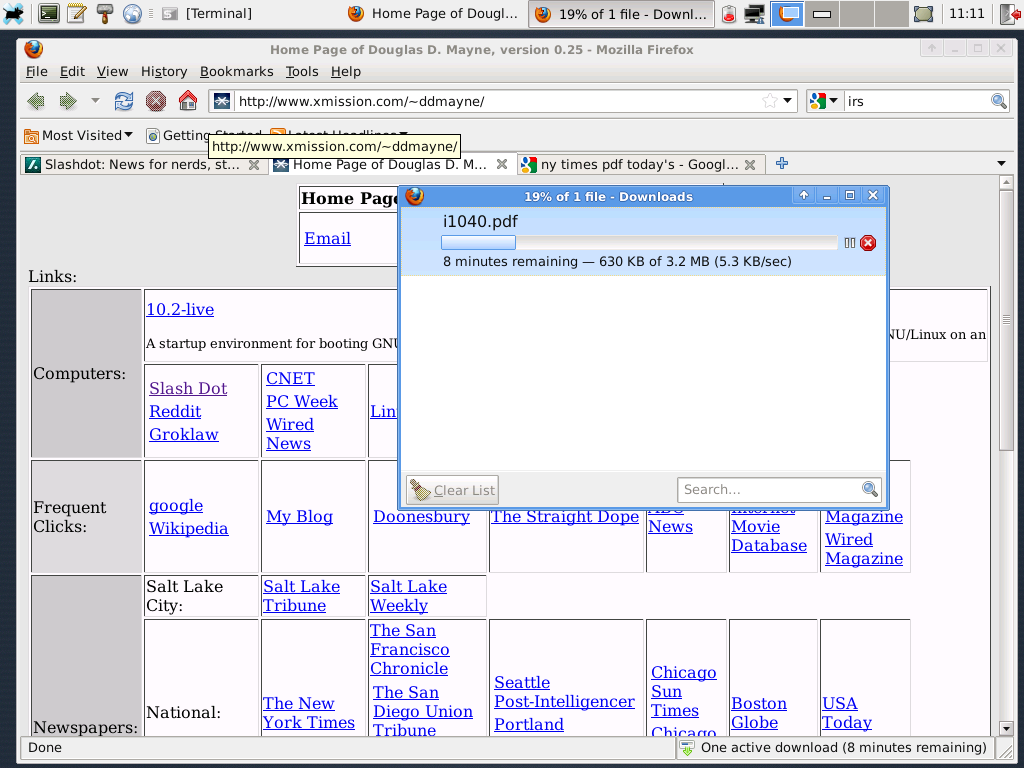
I don't think this hardware will boot from USB. I booted from a CD-ROM. Also, I couldn't find any PCMCIA wireless cards, but I did find a Viking 56k modem card. I connected to my ISP and started running Firefox. Here are a couple of screenshots. Notice that the download speed is 5 kB/s, i.e. 56k max speed. Here are the startup logs and some stats while running. Note times referenced in the log are wrong because I didn't set the clock before booting and it had reverted to its default time due to a dead motherboard battery.
 .
.
Final Word
People are constantly upgrading hardware and that means there are a lot of spare computers lying around. If you have a spare P4-class computer, or a spare P3/Celeron computer, then consider using it with a secure OS: GNU/Linux. This is especially true because Windows 95/98/Me/NT/W2k are all "expired." Meanwhile, the hardware lives on.
Update: 2010-12-21
For "desktop" use, I think the above hardware may be just a bit too low, especially in "live" mode relying on the USB bus. I left the PC running for the day, and it experienced some serious hiccups and performance degradation over time. I think this hardware would work better with an actual magnetic hard disk instead of the USB flash drive; and perhaps finding a system with a 650MHz P3 processor, instead of a 400MHz Celeron. I noticed some minor hiccups even on more modern hardware, but on hardware of this vintage the hiccups were much more severe. Maybe, I'll run some more tests later on other low-level hardware.
Possible next test bed:
One common problem of P3 vintage hardware is that the builtin USB is v1.1, not v2.0. That means it is usually necessary to find a USB 2.0 add-in card. The P4 generation (and later) motherboards usually do have builtin USB v2.0 slots. The other problem causing "premature" death of hardware is failing motherboard capacitors. That problem seems to be very prevalent on certain brands.
More Details
I don't think this hardware will boot from USB. I booted from a CD-ROM. Also, I couldn't find any PCMCIA wireless cards, but I did find a Viking 56k modem card. I connected to my ISP and started running Firefox. Here are a couple of screenshots. Notice that the download speed is 5 kB/s, i.e. 56k max speed. Here are the startup logs and some stats while running. Note times referenced in the log are wrong because I didn't set the clock before booting and it had reverted to its default time due to a dead motherboard battery.
 .
.Final Word
People are constantly upgrading hardware and that means there are a lot of spare computers lying around. If you have a spare P4-class computer, or a spare P3/Celeron computer, then consider using it with a secure OS: GNU/Linux. This is especially true because Windows 95/98/Me/NT/W2k are all "expired." Meanwhile, the hardware lives on.
Update: 2010-12-21
For "desktop" use, I think the above hardware may be just a bit too low, especially in "live" mode relying on the USB bus. I left the PC running for the day, and it experienced some serious hiccups and performance degradation over time. I think this hardware would work better with an actual magnetic hard disk instead of the USB flash drive; and perhaps finding a system with a 650MHz P3 processor, instead of a 400MHz Celeron. I noticed some minor hiccups even on more modern hardware, but on hardware of this vintage the hiccups were much more severe. Maybe, I'll run some more tests later on other low-level hardware.
Possible next test bed:
| Motherboard | DFI CM33-TL/G |
| CPU | Single slot: Celeron 1.3GHz |
| Memory | 512M to 1G PC133 |
| Video | onboard ATI 8M |
| USB | Belkin USB 2.0 on PCI bus |
One common problem of P3 vintage hardware is that the builtin USB is v1.1, not v2.0. That means it is usually necessary to find a USB 2.0 add-in card. The P4 generation (and later) motherboards usually do have builtin USB v2.0 slots. The other problem causing "premature" death of hardware is failing motherboard capacitors. That problem seems to be very prevalent on certain brands.
Interesting Computer Security Story
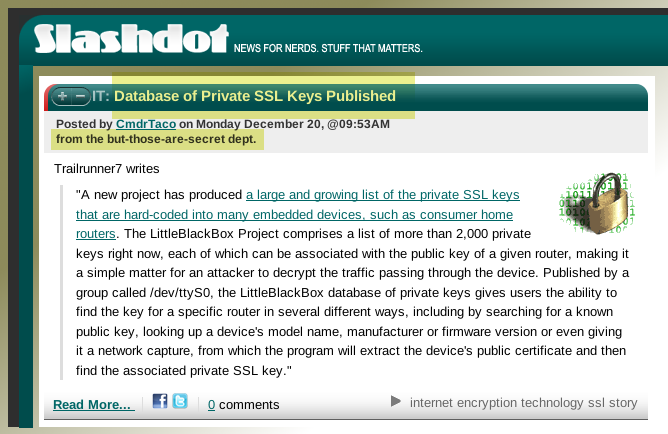
Here is an interesting headline with serious security implications for computer networks.
 .
.
 .
.
Subscribe to:
Posts (Atom)